> ## Documentation Index
> Fetch the complete documentation index at: https://learn.catalogbuilderapp.com/llms.txt
> Use this file to discover all available pages before exploring further.
# Integrations Tab (WhatsApp & Channels)
> Learn how to configure direct WhatsApp ordering, dynamic message templates, and external sales channels in the Integrations Tab.
The **Integrations Tab** in the Catalog Editor empowers you to transform your publication into an interactive conversational sales channel by connecting direct messaging and ordering tools.
 ***
## Direct Messaging: Links and WhatsApp (PDF + Flipbook)
The WhatsApp integration enables readers browsing your catalog on mobile or desktop to tap on any product card and start an instant chat conversation with your sales or customer support team.
### 1. Enabling WhatsApp Ordering
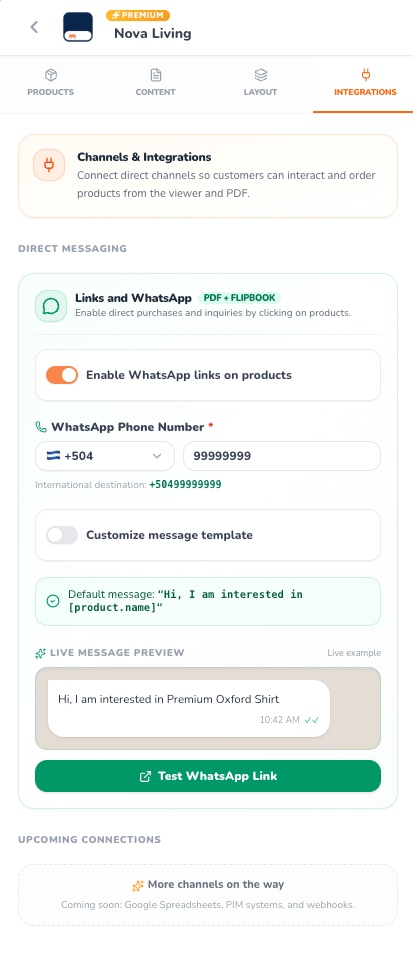
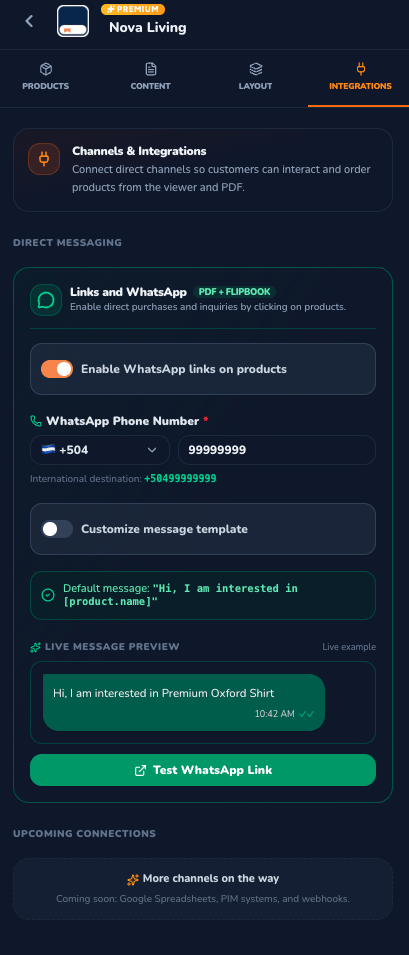
* **Enable WhatsApp links on products Switch**: The master toggle that turns every product card in your catalog into a clickable ordering button.
* **Dual Channel Compatibility**: Interactive links function seamlessly across both digital **Flipbooks** and exported high-resolution **PDF** documents!
***
## Phone Configuration
* **Country Code Selector**: Choose your international dialing prefix from a searchable dropdown featuring national flags (e.g., `+504`, `+1`, `+52`, `+34`).
* **WhatsApp Phone Number**: Enter your dedicated commercial support or sales rep phone number.
* **International Destination Indicator**: Automatically displays the clean sanitized international dial format (e.g., `+50499999999`) to prevent dialing errors.
***
## Customizable Message Templates & Dynamic Variables
When customers click on a product, WhatsApp opens with a pre-filled message ready to send.
### Message Modes:
* **Default Template**: Automatically pre-fills: `"Hi, I am interested in [product.name]"`.
* **Customize Message Template Switch**: Toggle on to craft tailored sales pitches or wholesale inquiries.
### Interactive Variable Chips
Click any dynamic token chip to insert it at your cursor's position in the template:
| Token | Description |
| :- | :- |
| `[product.name]` | The title of the specific product clicked |
| `[product.price]` | The formatted price of the item |
| `[product.sku]` | The product's SKU or inventory code |
| `[product.category]` | The assigned product category |
| `[catalog.title]` | The active catalog name (e.g., Nova Living) |
***
## Live Message Preview & Test Link
Inspect the rendered message in a realistic WhatsApp chat bubble simulation, featuring realistic styling and delivery checkmarks.
Click the green **Test WhatsApp Link** button to launch WhatsApp with your active configuration, verifying message delivery before publishing.
***
## Upcoming Connections
CatalogBuilderApp is continuously expanding its integration ecosystem. Upcoming connectors include:
* **Google Spreadsheets**: Two-way sync for real-time inventory and pricing adjustments.
* **PIM Systems**: Automated product catalog synchronization from enterprise databases.
* **Custom Webhooks**: Connect catalog interactions directly to your CRM, Zapier, or internal ERP.
This documentation is built and hosted on [Mintlify](https://mintlify.com), a developer documentation platform.
***
## Direct Messaging: Links and WhatsApp (PDF + Flipbook)
The WhatsApp integration enables readers browsing your catalog on mobile or desktop to tap on any product card and start an instant chat conversation with your sales or customer support team.
### 1. Enabling WhatsApp Ordering
* **Enable WhatsApp links on products Switch**: The master toggle that turns every product card in your catalog into a clickable ordering button.
* **Dual Channel Compatibility**: Interactive links function seamlessly across both digital **Flipbooks** and exported high-resolution **PDF** documents!
***
## Phone Configuration
* **Country Code Selector**: Choose your international dialing prefix from a searchable dropdown featuring national flags (e.g., `+504`, `+1`, `+52`, `+34`).
* **WhatsApp Phone Number**: Enter your dedicated commercial support or sales rep phone number.
* **International Destination Indicator**: Automatically displays the clean sanitized international dial format (e.g., `+50499999999`) to prevent dialing errors.
***
## Customizable Message Templates & Dynamic Variables
When customers click on a product, WhatsApp opens with a pre-filled message ready to send.
### Message Modes:
* **Default Template**: Automatically pre-fills: `"Hi, I am interested in [product.name]"`.
* **Customize Message Template Switch**: Toggle on to craft tailored sales pitches or wholesale inquiries.
### Interactive Variable Chips
Click any dynamic token chip to insert it at your cursor's position in the template:
| Token | Description |
| :- | :- |
| `[product.name]` | The title of the specific product clicked |
| `[product.price]` | The formatted price of the item |
| `[product.sku]` | The product's SKU or inventory code |
| `[product.category]` | The assigned product category |
| `[catalog.title]` | The active catalog name (e.g., Nova Living) |
***
## Live Message Preview & Test Link
Inspect the rendered message in a realistic WhatsApp chat bubble simulation, featuring realistic styling and delivery checkmarks.
Click the green **Test WhatsApp Link** button to launch WhatsApp with your active configuration, verifying message delivery before publishing.
***
## Upcoming Connections
CatalogBuilderApp is continuously expanding its integration ecosystem. Upcoming connectors include:
* **Google Spreadsheets**: Two-way sync for real-time inventory and pricing adjustments.
* **PIM Systems**: Automated product catalog synchronization from enterprise databases.
* **Custom Webhooks**: Connect catalog interactions directly to your CRM, Zapier, or internal ERP.
This documentation is built and hosted on [Mintlify](https://mintlify.com), a developer documentation platform.